Centralized infrastructure management
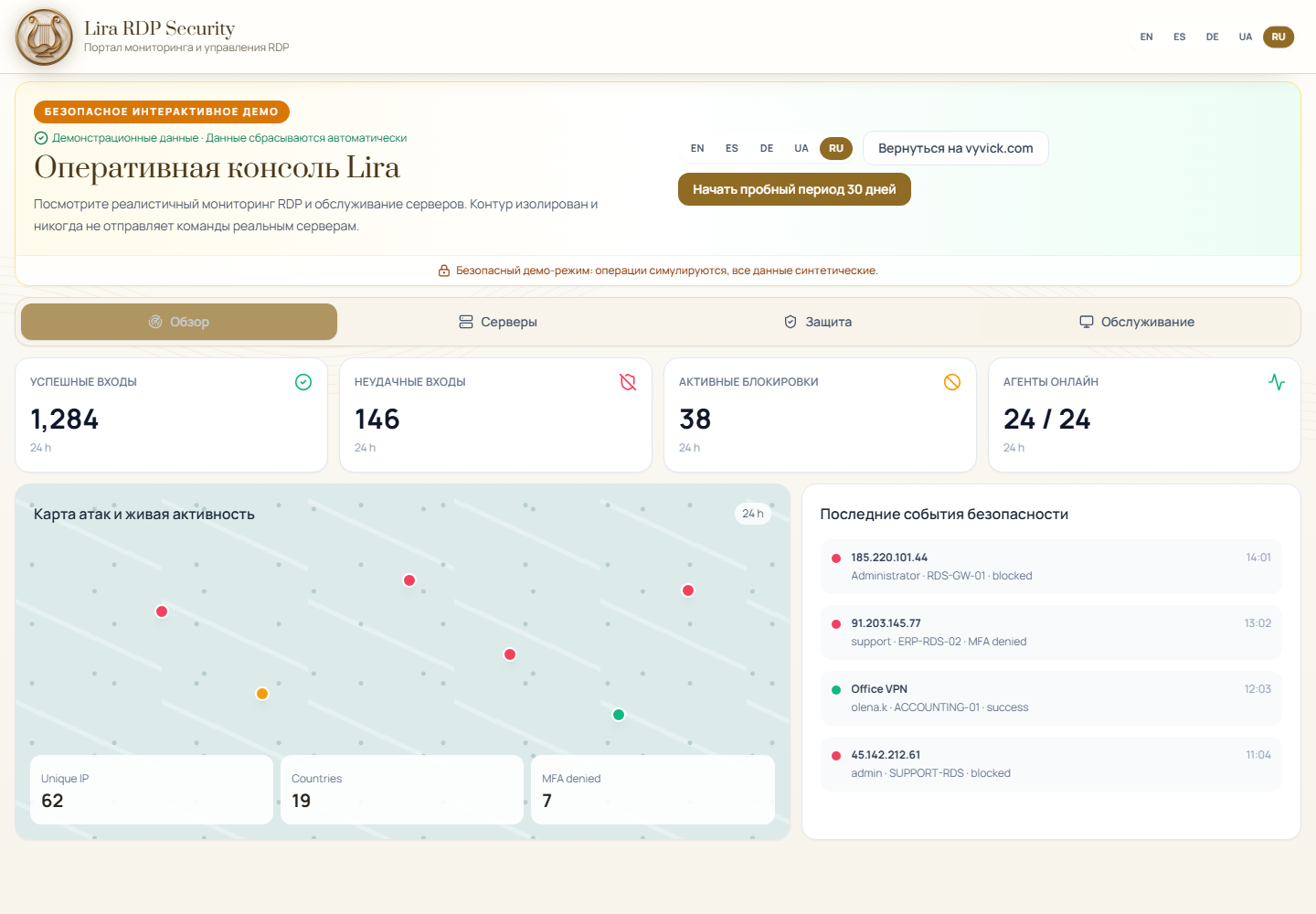
The attack-source map, events, IP blocks, MFA, updates, and Microsoft Defender are available in one portal for an individual server or the entire managed infrastructure.
Protect RDP access with two-factor authentication (2FA/MFA), block credential attacks, maintain Windows security, and monitor multiple environments from one platform.
Full features for 30 days · up to 3 servers · no credit card · no automatic charge
Structured workflows enable operators and managed service providers to review significant events and perform the required actions within a unified interface.
The attack-source map, events, IP blocks, MFA, updates, and Microsoft Defender are available in one portal for an individual server or the entire managed infrastructure.
The normal agent channel uses outbound HTTPS/WSS and updates automatically; it requires no inbound management port. Optional WinRM is a separate diagnostic and recovery path. Connecting the first server generally requires only a few minutes.
IP blocking and unblocking, Windows Update installation, Microsoft Defender scans, RDP TLS deployment, and restarts are performed through a command queue for connected agents.
Isolated client workspaces, roles, enrollment tokens, and an audit trail support multiple organizations without requiring a separate product deployment for each customer.
Write to us directly—no account or portal ticket is required.
Choose the Windows Server security task you need to solve.
RDP brute force protection for Windows Server with failed-logon detection, temporary Windows Firewall IP blocks, allowlists and audited response in Lira.
Monitor Windows Server availability, CPU, memory, disks, RDP authentication, Defender, updates, firewall and TLS from the Lira portal.
Windows Server patch management from one console: check and install updates, track agent-confirmed progress, audit actions and schedule controlled reboots with Lira.
Review Microsoft Defender status, update signatures, run scans, manage threats and control SQL Server or PostgreSQL exclusions with Lira.
RDP MFA for MSP teams with tenant-scoped 2FA/MFA policy, separated customer servers, IP blocking, operator permissions and audited Windows Server operations.
Inspect RDP listener certificates, validate names and expiry, deploy approved TLS bindings and restore the listener safely with Lira.
Protect remote access, maintain Windows Servers, and operate multiple environments without switching between separate administrative tools.
Monitor successful and failed RDP logons, automatically block credential attacks in Windows Firewall, and enforce TOTP MFA before the desktop session starts.
Schedule updates and restart windows, manage Microsoft Defender, firewall and RDP TLS, and monitor CPU, memory and disk pressure from the same console.
Use isolated organization workspaces, roles, scoped server access and audit records for an internal server fleet or multiple MSP customers.
MEASURED IN THE FIRST PILOT
Anonymized 30-day measurements and the cumulative blocking total from the first Lira pilot.
Live measurements — generated 2026-10-12 20:32 UTC.
Lira RDP Security
Lira is assessed against the OWASP Top 10 risk categories as part of the internal application-security review.
This describes internal security testing and does not constitute independent certification.
Security assuranceControlled engineering guidance
Inside the authenticated Lira console, the assistant evaluates the current server state and builds a safe sequence for certificates, MFA and access recovery.
Checks agent connectivity, event collection, updates and Windows Firewall before recommending a change.
Identifies prerequisites and directs the administrator through the existing audited certificate workflow.
Verifies enrollment and recovery prerequisites before enforcement, reducing the risk of losing administrative access.
Keeps changes within role-based, logged Lira workflows and preserves a clear route back to server access.
The assistant is available only after authentication. It does not expose server commands or management access on the public website, and high-risk operations continue to require administrator confirmation.
RDP TLS · Let's Encrypt · DNS-01
Lira monitors certificates across the server fleet, issues publicly trusted Let's Encrypt certificates, and deploys them to Remote Desktop through the agent.
Ready-made PFX/PEM files, commercial CA certificates, and multiple DNS names (SANs) are supported as well.
The attack-source map, notifications, server registry, and per-server controls are designed for routine production operations.
SAFE INTERACTIVE PRODUCT TOUR
Explore the real portal design with synthetic server, attack, MFA, Defender, update, and disk data. No account, card, or infrastructure access required.
Switch between monitoring, server park, protection, and maintenance screens built from the current Lira interface.
Review attack activity, expiring bans, RDP MFA, Windows Update, Defender, users, resources, and disk pressure.
The demo does not use production sessions or APIs. Every action is simulated and cannot touch a real Windows server.
Try every feature for 30 days on up to 3 servers without a credit card. After the trial, purchase the number of server licenses you need; no paid subscription starts automatically.
Progressive per-server tiers: the discount applies only to licenses above each threshold, so adding a license never reduces the total.
Calculator
Annual billing — 20% discount.
Create an organization, install the agent, and begin centralized monitoring without opening additional inbound ports.
Register, name your organization, copy the enrollment token from the portal.
Guided enrollment for each Windows RDP host. The normal agent channel uses outbound HTTPS/WSS; optional WinRM remains a separate diagnostic and recovery path.
Use the centralized console to review attack sources, enforce MFA, manage automatic IP blocks, and perform maintenance operations.
Portal + Windows agent. Commands go outbound over HTTPS; optional WinRM fallback when the agent is offline.
Agent installation becomes available after the organization is registered. The secure portal automatically generates an individual key linked to your organization and provides a personalized installation command. This ensures that each server is connected to the correct environment without using shared installation credentials.
Product assistant and tickets — we reply by email.
Pricing, trial, agent install, MFA, firewall sync — answers in the portal.
Open support consoleOpen a ticket with a reference number.
Sign in to open a ticketDirect contact and updates
Contact the Vyvick team privately or follow the official engineering channel.
Ask about Lira, a pilot deployment, licensing or cooperation in a private conversation with the corporate account.
Contact us on TelegramFollow Lira, Elovit and Niya publications, operational guidance and product announcements in one channel.
Follow the Telegram channelDo not send passwords, MFA codes, recovery codes or infrastructure access keys through Telegram. Technical incidents remain documented in the support portal.
After registration and agent installation, monitoring, IP blocking, and MFA are available from a unified console.